
Are you searching for a Pokepath download to get the stable desktop version of this popular Pokémon Tower Defense game? You're in the right place! This comprehensive guide will walk you through everything you need to know about downloading and installing Pokepath TD on your computer.
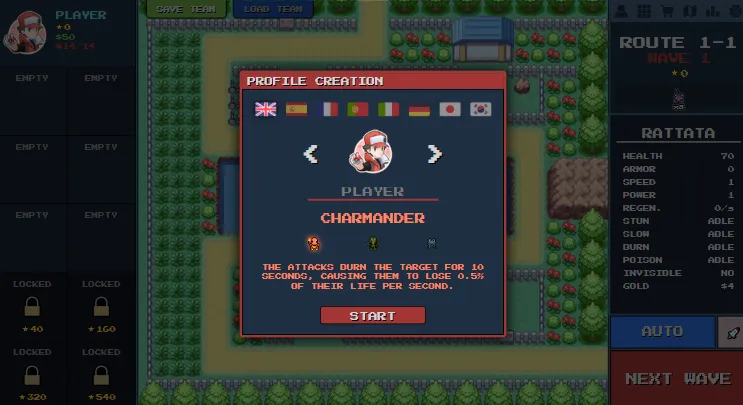
Why Choose the Desktop Version Over Browser?
The browser version of Pokepath TD works well for quick sessions, but the desktop download offers significant advantages:
🛡️ Enhanced Stability
- No risk of losing progress due to browser crashes or tabs being closed
- More reliable performance, especially during long gaming sessions
- Better handling of large save files
💾 Safer Progression
- Desktop versions are specifically noted as "more stable" for long-term play
- Reduced risk of save corruption that can sometimes occur in browser versions
- Ability to run the game even when offline
✨ Priority Updates
- New features and quality-of-life improvements often hit desktop versions first
- Better optimization for your specific operating system
- Access to the latest patches and bug fixes sooner
Official Pokepath Download Links
The official Pokepath TD downloads are available on itch.io as a "name your own price" offering - you can download it for free or pay what you want!
Official Download Page: https://khydra98.itch.io/pokepath
Platform Availability
🪟 Windows
- Format: Setup Installer (.exe)
- Size: ~101 MB (current version 1.3.6)
- Installation: Standard Windows setup wizard
🐧 Linux
- Format: AppImage
- Size: ~129 MB
- Installation: Mark as executable and run
🍎 Mac
- Format: macOS Application
- Size: ~180 MB
- Installation: Standard macOS app installation
Step-by-Step Pokepath Download Guide
Step 1: Visit the Official Page
Navigate to https://khydra98.itch.io/pokepath using your web browser.
Step 2: Choose Your Platform
Click the "Download Now" button and select your operating system:
- Windows: Choose "Pokepath TD - Windows (Setup)"
- Linux: Choose "Pokepath TD - Linux (AppImage)"
- Mac: Choose "Pokepath TD - Mac"
Step 3: Name Your Price (Optional)
The game is "pay what you want" - you can enter $0.00 to download for free, or contribute any amount you'd like to support the developer.
Step 4: Download and Install
- Windows: Run the .exe file and follow the setup wizard
- Linux: Mark the AppImage as executable (
chmod +x Pokepath*.AppImage) and run it - Mac: Open the downloaded .dmg file and drag the app to your Applications folder
Step 5: Launch and Play
Open Pokepath TD and start your Pokémon Tower Defense adventure!
Ready to Play?
Jump into Pokepath TD and start your adventure now!
Tip: Export your save (Menu → Export) regularly. For long or intensive sessions, the desktop build is more stable.
Essential Save Management (Critical for All Players)
One of the most important aspects of Pokepath TD is managing your save files. Here's how to keep your progress safe:
Exporting Your Save
- Open the in-game Menu (usually accessible via a menu button)
- Select Export
- Download the
.txtsave file to a safe location - Recommendation: Export after every major milestone or daily session
Importing Your Save
- Open the in-game Menu
- Select Import
- Choose your saved
.txtfile or paste the save data - Confirm the import to restore your progress
Pro Tip: Keep multiple backup copies of your save files in different locations (cloud storage, external drives, etc.) to prevent any loss.
Quick Gameplay Controls
Once you have Pokepath TD downloaded and running, here are the essential controls to get you started:
- X: Toggle Pokémon attack ranges (essential for strategy)
- Left Click: Move Pokémon to new positions
- Right Click: View detailed Pokémon information
- Shift: Change game speed (speed up or slow down)
- Mouse Wheel: Zoom in/out on the battlefield
What Makes Pokepath TD Special?
Pokepath TD offers a unique Pokémon Tower Defense experience with:
- 9 Different Routes: Each with unique challenges and Pokémon encounters
- Leveling & Evolution: Watch your Pokémon grow stronger and evolve
- Auto Mode: AFK-friendly farming while you're away
- Save Export/Import: Cross-device progression
- Strategic Depth: Different team compositions for various maps
Common Issues and Solutions
Can't Download?
- Try a different browser or clear your browser cache
- Check your internet connection
- Disable any ad-blockers temporarily
Game Won't Launch?
- Windows: Run as administrator or check antivirus exclusions
- Linux: Ensure the AppImage has execute permissions
- Mac: Check Gatekeeper settings for unsigned apps
Save File Issues?
- Always export saves before updating the game
- Keep multiple backup copies
- If importing fails, try a different browser or device
Join the Community
Pokepath TD has an active community where you can:
- Get help with difficult routes
- Share strategies and team compositions
- Stay updated on new patches
- Report bugs or suggest features
Official Discord: Join the Pokepath TD Discord
Final Recommendations
- Download the desktop version for the best experience
- Export saves regularly - this cannot be emphasized enough
- Join the Discord for community support and updates
- Keep backups of your save files in multiple locations
- Have fun exploring all 9 routes and building your ultimate team!
Ready to start your Pokepath TD journey? Download now and begin defending against waves of Pokémon with your own customized team!
Development & Changelog
The official desktop build is actively developed and updated on itch.io. For full patch notes and the latest downloads, check the official page: https://khydra98.itch.io/pokepath.
Recent devlog entries (overview):
- Patch 1.3.6 — Latest small fixes and improvements (see itch.io for details).
- Patch 1.3.5 (fix) — Bug fixes and stability patches.
- Patch 1.3.4 + Mac Version — Added macOS build and several improvements.
- Patch 1.3.3 — Balance adjustments and miscellaneous fixes.
- Patch 1.3.2 — Quality-of-life updates and bug fixes.
- Patch 1.3.1 — Bug fixes and targeting/interaction improvements.
- Patch 1.3 — Items and Challenges Update — Major feature update introducing equippable items and new challenge systems (backup your save before updating).
- Patch 1.2.7 — Earlier fixes and quality-of-life changes.
Note: the desktop download on itch.io is listed as "name your own price" — you can download it for free or choose to support the developer. Desktop builds are updated more frequently and are generally more stable than the browser build, so keep an eye on the itch.io devlog for the most current information.
Last updated: January 10, 2026 | Compatible with Pokepath TD version 1.3.6
Frequently Asked Questions
Below are common questions about downloading and playing Pokepath TD, with concise answers and steps you can follow.
Is Pokepath TD free to download?
Yes — the desktop builds on itch.io are published as a "name your own price" offering. You can enter $0 to download for free or choose to support the developer with a donation.
How do I download and install the desktop version?
- Windows: download the Setup (.exe) from the itch.io page and run the installer.
- Linux: download the AppImage, mark it executable (
chmod +x Pokepath*.AppImage) and run it. - Mac: download the macOS package and install it as a normal macOS app.
Can I play without downloading?
Yes — you can play the browser build at https://pokepathtd.app. For short sessions the web build is convenient; for long-term progression prefer the desktop build.
How do I back up my save file?
Open the in-game Menu → choose Export → download the .txt save file to a safe location. To restore, use Menu → Import and paste/load the .txt file.
What if the game crashes or I find a bug?
Please report issues via the community channels (itch.io comments, Discord). When reporting, include your OS, browser (if web), reproduction steps, and an exported save when possible.
References & Links
- Recommended internal resources
- Pokepath TD Best Team — Part 1: Route 1 Guide — No-damage Route 1 setups, positioning and video walkthroughs.
- Pokepath TD Best Team — Part 2: Route 2 Guide — Route 2 compositions and optimization tips.
- Pokepath TD Best Team — Part 3: Route 3 Guide — Advanced strategies and boss tactics.
- Pokepath TD Tier List — Create and export custom Pokepath TD tier lists.